Kubernetes Architecture and Primitives: From Containers to Orchestration
Kubernetes Architecture and Primitives: From Containers to Orchestration
Running containers with standalone Docker commands works well on a single machine, but operating a container fleet across multiple hosts introduces critical operational challenges: recovering from container crashes, executing zero-downtime rollouts, and dynamically routing network traffic. Kubernetes solves this by operating as a declarative orchestration system that continuously reconciles the cluster's actual state with your defined desired state. Through its centralized cluster architecture, Kubernetes delegates administrative control to a dedicated control plane while worker nodes manage container execution and health monitoring.
In this guide, we break down Kubernetes architecture from first principles to transition your mental model from isolated Docker containers to automated orchestration. We examine how the control plane exposes its API through the API server, uses the scheduler to place unassigned Pods onto suitable nodes, and packages control loops into the controller manager. We then trace how worker node components—specifically the kubelet ensuring container health and kube-proxy maintaining network rules—execute workloads, before analyzing workload hierarchies from Pods to Deployments, stable service networking, and automated health checks.
Table of Contents
- Why Kubernetes? From Manual Docker to Automated Orchestration
- Cluster Architecture: Control Plane and Worker Nodes
- The Workload Hierarchy: Pods, ReplicaSets, and Deployments
- Service Networking: Stable Virtual IPs and Traffic Distribution
- Health Probes: Startup, Liveness, and Readiness
- Auxiliary Primitives and the End-to-End Request Lifecycle
- Summary & What's Next
1. Why Kubernetes? From Manual Docker to Automated Orchestration
Docker packages an application and its runtime dependencies into a reproducible, isolated container. Running docker run on a local workstation or a single virtual machine provides a reliable developer experience, but managing standalone Docker containers in production quickly runs into severe operational walls. To use an analogy: Docker is a single musical instrument; Kubernetes is the conductor coordinating the entire symphony.
The Operational Limits of Standalone Docker
When deploying distributed microservices across multiple physical or virtual hosts, manual container operations fail at scale:
- Host failures and downtime: If a physical server hosting a Docker daemon crashes, all containers on that host terminate immediately. Standalone Docker cannot detect external node failures or automatically resurrect containers on healthy hardware.
- Bespoke operational tooling: Teams managing raw containers inevitably build fragile maintenance layers—custom shell scripts, external cron jobs, and host-level systemd units—to inspect health statuses, trigger restarts, and map ephemeral container ports.
- Manual scaling bottlenecks: Handling sudden traffic spikes requires operators to provision new VMs, run manual deployment commands, and reconfigure reverse proxies or load balancers with the new host IP addresses.
Declarative Reconciliation vs. Imperative Management
Kubernetes fundamentally shifts operations from an imperative model ("run this container now") to a declarative reconciliation model ("maintain three healthy replicas of this workload").
Rather than executing continuous shell commands to keep services online, you declare your desired system state in version-controlled manifests. As outlined in The Kubernetes Visual Handbook, Kubernetes operates via an infinite reconciliation loop where controllers constantly observe actual state, compare it against desired state, and act to eliminate any discrepancies.
Furthermore, Google Cloud's GKE cluster architecture documentation highlights that the control plane actively schedules workloads onto nodes while managing workload lifecycles, scaling, networking, and storage. If a worker node crashes or an application process fails its health checks, the control plane immediately detects the deficit and reschedules replacement workloads across the remaining cluster pool without human intervention.
| Operational Dimension | Standalone Docker | Kubernetes Orchestration |
|---|---|---|
| Management Paradigm | Imperative commands (docker run, docker restart) | Declarative state reconciliation loops |
| Failure Recovery | Manual intervention or custom watchdog scripts | Automated self-healing and workload rescheduling |
| Multi-Host Scheduling | None (bound to a single Docker host) | Native scheduling based on resource requests and node capacity |
| Service Discovery | Static port forwarding and manual proxy updates | Cluster-internal DNS and dynamic virtual IPs |
| Application Updates | Disruptive manual container replacement | Automated, zero-downtime rolling updates |
2. Cluster Architecture: Control Plane and Worker Nodes
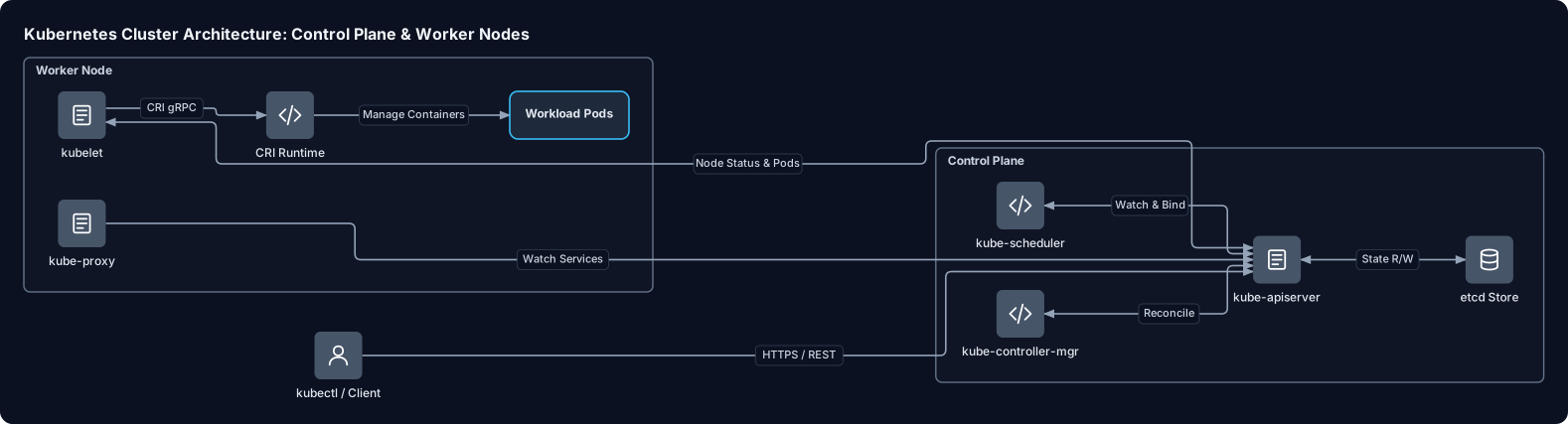
To transition from operating standalone Docker daemons to managing distributed infrastructure, we must first examine how Kubernetes decouples administrative orchestration from container execution. As detailed in the Kubernetes components documentation, a cluster is split into two primary operational tiers: the control plane and one or more worker nodes.
The control plane makes global decisions about the cluster (such as scheduling workloads and responding to node failures), while worker nodes supply the actual compute capacity to run your containerized workloads.
The Control Plane: The Cluster Brain
The control plane maintains the desired state of all workloads across your machines, acting as the decision-making engine:
kube-apiserver: The stateless entry point and central communication hub for the entire cluster. According to Google Cloud's GKE cluster architecture guide, all internal components and external client requests (kubectl) interact strictly through this REST API. It handles authentication, authorization, validation, and admission control. Crucially, it is the only component that directly reads from or writes toetcd.etcd: A strongly consistent, distributed key-value store that acts as the cluster's single source of truth. As outlined in the Kubernetes architecture documentation,etcdholds all cluster state, resource specifications, and runtime metadata. Becausekube-apiserveris stateless, multiple API server replicas can run behind a load balancer while sharing this common datastore.kube-scheduler: When you submit a Pod manifest without a designated node assignment, the scheduler assigns it to a suitable machine. As described in The Kubernetes Visual Handbook, the scheduler evaluates nodes through filtering (eliminating nodes that do not meet CPU, memory, or policy constraints) and scoring (ranking remaining nodes to pick the optimal candidate).kube-controller-manager: A single binary combining multiple control loops that continuously compare the current state of the cluster with the desired state stored inetcd, issuing corrections whenever drift occurs.
Worker Nodes: The Execution Fleet
While the control plane handles coordination, worker nodes provide the compute infrastructure where user workloads execute. As highlighted in DevOpsCube's Kubernetes architecture guide, each worker machine hosts three primary elements:
kubelet: The primary node agent running as a system daemon. It registers the node with the API server, watches for Pod assignments targeted at its host, and interacts directly with the local runtime to ensure containers match their declaredPodSpecdefinitions and remain healthy.- Container Runtime: The underlying software (such as containerd or CRI-O) responsible for pulling container images, configuring namespaces and cgroups, and running the container processes.
kube-proxy: A network proxy running on each node that synchronizes host network rules (such asiptablesor IPVS). It translates abstract virtual IPs into direct routing pathways across dynamic worker workloads.
| Component | Placement | Statefulness | Core Responsibility |
|---|---|---|---|
kube-apiserver | Control Plane | Stateless | Exposes the Kubernetes API and validates cluster read/write operations |
etcd | Control Plane | Stateful | Serves as the distributed, consistent key-value backing store |
kube-scheduler | Control Plane | Stateless | Selects target nodes for unassigned Pods using filtering and scoring |
kube-controller-manager | Control Plane | Stateless | Executes core reconciliation loops to maintain desired cluster state |
kubelet | Worker Node | Stateless agent | Communicates with the API server and enforces container specifications |
kube-proxy | Worker Node | Stateless agent | Manages local node network rules to direct traffic to target Pods |
| Container Runtime | Worker Node | Local runtime | Executes container lifecycles on the node OS |
3. The Workload Hierarchy: Pods, ReplicaSets, and Deployments
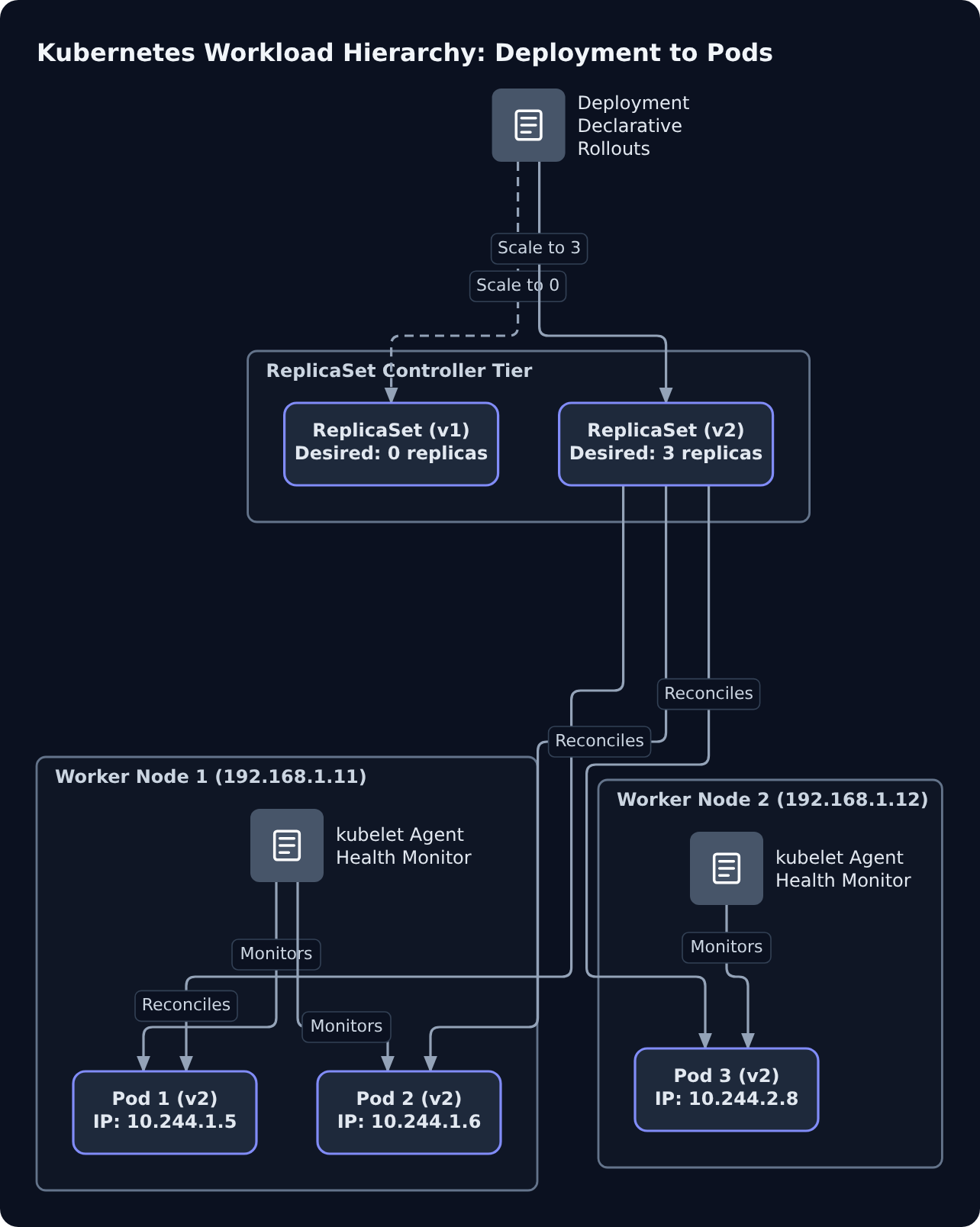
To run applications reliably across a cluster, Kubernetes does not manage individual containers directly. Instead, it layers primitives into an abstraction hierarchy: Deployments manage ReplicaSets, which manage Pods, which in turn house your application containers.
1. The Pod: The Atomic Unit of Scheduling
A Pod is the smallest deployable atomic unit in Kubernetes. While a Docker workflow treats a single container as the deployment artifact, Kubernetes wraps one or more tightly coupled containers into a Pod.
All containers inside the same Pod share:
- A single network namespace and loopback interface (
localhost), allowing intra-Pod processes to communicate via local ports. - A shared Pod IP address routable within the cluster network.
- Shared storage volumes mounted into multiple containers simultaneously.
Crucially, raw Pods are ephemeral and non-durable. Worker nodes host Pods, and the local kubelet agent ensures containers defined in PodSpecs are running and healthy. However, if an entire host node fails, a standalone Pod is not rescheduled or migrated—it is permanently lost. Production workloads therefore require higher-level managers.
2. ReplicaSets: Declarative Self-Healing and Scale
A ReplicaSet guarantees that a specified number of identical Pod instances remain running at all times. It enforces this contract using an infinite reconciliation loop:
- Observe: Query the cluster state to count running Pods matching a specific label selector.
- Compare: Evaluate the actual active Pod count against the desired target (
spec.replicas). - Act: Issue requests to the API server to create new Pods when counts drop below target, or terminate excess Pods if counts exceed target.
If an underlying worker node crashes, the control plane notices the lost replicas during its reconciliation cycle and schedules replacement Pods onto healthy worker machines, providing automated self-healing.
3. Deployments: Declarative Rolling Updates and Rollbacks
While ReplicaSets manage instance counts, they cannot smoothly upgrade running workloads. If you update a container image inside a standalone ReplicaSet, existing Pods continue running untouched until manually deleted.
A Deployment solves this by managing multiple ReplicaSets declaratively. When you apply a new container image or configuration, the Deployment controller provisions a new ReplicaSet, scales it up incrementally, and simultaneously scales down the old ReplicaSet. This mechanism provides zero-downtime rolling updates and instant rollbacks.
Here is a complete, minimal Deployment specification defined in JSON:
{
  "apiVersion": "apps/v1",
  "kind": "Deployment",
  "metadata": {
    "name": "web-api",
    "labels": {
      "app": "web-api"
    }
  },
  "spec": {
    "replicas": 3,
    "selector": {
      "matchLabels": {
        "app": "web-api"
      }
    },
    "template": {
      "metadata": {
        "labels": {
          "app": "web-api"
        }
      },
      "spec": {
        "containers": [
          {
            "name": "server",
            "image": "nginx:1.27-alpine",
            "ports": [
              {
                "containerPort": 80
              }
            ]
          }
        ]
      }
    }
  }
}
You submit this declaration with kubectl apply -f deployment.json. In this hierarchy, you define the desired operational state on the Deployment. The Deployment orchestrates the ReplicaSets, the ReplicaSets ensure the target quantity of Pods exist, and worker node runtimes execute your containers.
4. Service Networking: Stable Virtual IPs and Traffic Distribution
While Deployments solve replication and rolling updates, they introduce a fundamental networking problem: Pod IPs are ephemeral. Whenever a node dies, a deployment rolls out a new image, or a horizontal autoscaler shrinks your workload, the affected Pods are destroyed along with their dynamic IP addresses. If upstream callers or other internal microservices attempt to hardcode direct Pod IP connections, communication breaks the moment a Pod restarts.
The Service Primitive and EndpointSlices
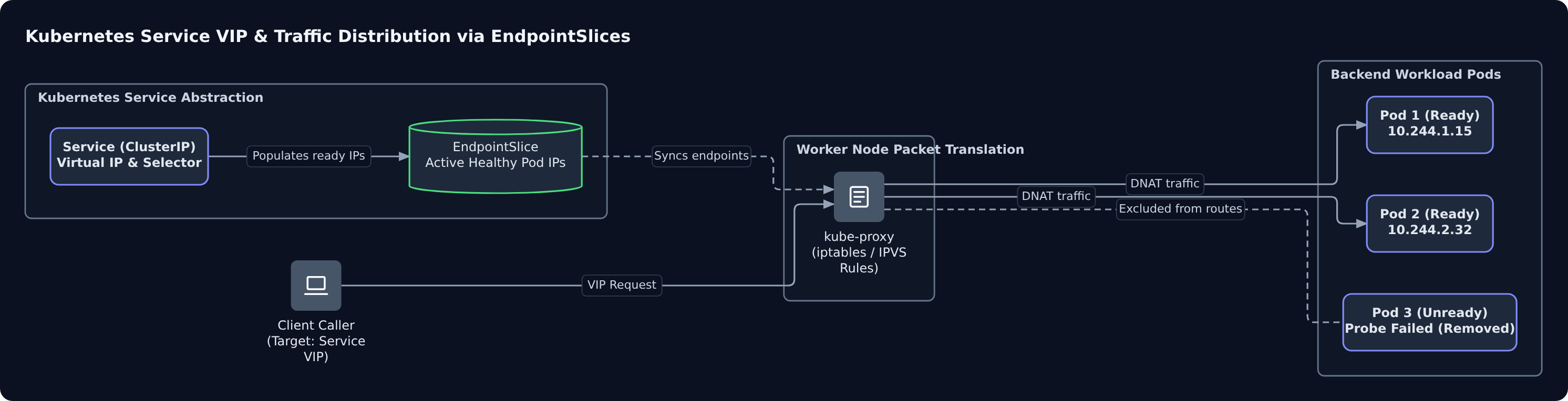
To decouple client requests from ephemeral Pod IPs, Kubernetes introduces the Service resource. A Service acts as a durable abstraction layer, assigning a permanent virtual IP (ClusterIP) and a persistent cluster-internal DNS name to an arbitrary collection of Pods selected by labels.
Rather than routing directly to pods, the Service points to dynamic EndpointSlices that track the real-time IP addresses of ready, healthy Pods. As detailed in the Kubernetes documentation on probes, when a container fails its readiness probe, the control plane immediately strips the Pod IP from the corresponding EndpointSlice. The container stays running, but incoming traffic ceases until the probe passes again.
How kube-proxy Routes Traffic
The virtual IP assigned to a Service is not bound to any physical network interface. Instead, kube-proxy maintains network rules on every worker node to implement the Service abstraction. Running on worker nodes alongside the kubelet as described in The Kubernetes Visual Handbook, kube-proxy configures local packet-filtering mechanisms—such as Linux iptables or IPVS—to intercept requests directed to the Service's virtual IP and rewrite the destination to one of the healthy backend Pod IPs.
Here is a minimal Service manifest in JSON routing port 80 traffic to Pods carrying the label app: web-api:
{
  "apiVersion": "v1",
  "kind": "Service",
  "metadata": {
    "name": "web-api"
  },
  "spec": {
    "type": "ClusterIP",
    "selector": {
      "app": "web-api"
    },
    "ports": [
      {
        "port": 80,
        "targetPort": 8080
      }
    ]
  }
}
Service Types and Exposure Scope
Kubernetes defines multiple Service types depending on whether your workload is cluster-internal or needs to accept ingress from the outside world:
| Service Type | Exposure Scope | Routing Mechanism | Primary Use Case |
|---|---|---|---|
| ClusterIP | Internal cluster only | Default static virtual IP reachable strictly inside worker nodes. | Inter-service communication, backend APIs, internal databases. |
| NodePort | External to cluster | Allocates a dedicated port (usually 30000–32767) across every worker node's external IP. | Development testing or direct node ingress without cloud load balancers. |
| LoadBalancer | External to cluster | Provisions a cloud provider load balancer (e.g., AWS NLB, GCP Load Balancer) that forwards traffic to NodePorts. | Production-grade public traffic ingress for internet-facing applications. |
5. Health Probes: Startup, Liveness, and Readiness
In standalone Docker, the container runtime considers a container healthy as long as PID 1 remains active. However, real-world services can deadlock, exhaust thread pools, or remain unresponsive during lengthy startup routines while keeping their main process alive. To automate remediation and prevent traffic black-holing, the kubelet executes three dedicated health probes: Startup, Liveness, and Readiness.
The Three Probe Types
Each probe serves a distinct operational objective across the container lifecycle:
| Probe Type | Evaluation Timing | Kubelet Action on Failure | Operational Objective |
|---|---|---|---|
| Startup | At container launch until initial success | Kills and restarts the container | Shields slow-initializing applications from premature termination |
| Liveness | Post-startup, throughout container life | Kills and restarts the container | Recovers from deadlocks, infinite loops, and unrecoverable broken states |
| Readiness | Post-startup, throughout container life | Removes container IP from Service EndpointSlices | Isolates instances during heavy load, cache hydration, or temporary faults |
1. Startup Probes: Guarding Slow Initialization
When applications require extended time to hydrate in-memory caches, parse schemas, or execute database migrations, standard health checks can trigger premature restart loops. As detailed in the Kubernetes documentation on probes, a startup probe disables both liveness and readiness checks until the container successfully completes initialization. If the startup probe does not succeed within its configured failure threshold, the kubelet terminates the container and enforces the Pod's restart policy.
2. Liveness Probes: Self-Healing Deadlocks
Once an application marks itself as started, the kubelet runs liveness probes to confirm ongoing progress. If an unhandled exception locks a worker thread or a resource leak causes an internal deadlock, the application fails this check. When consecutive failures exceed the configured threshold, the kubelet kills the container and initiates a restart to restore service availability.
3. Readiness Probes: Dynamic Traffic Gating
A running process is not necessarily capable of processing live requests. An application might temporarily saturate its thread pool or face downstream throttling. According to the Kubernetes probe specification, failing a readiness probe prompts the EndpointSlice controller to remove the Pod IP from the Service endpoints without terminating the process. Once the Pod recovers and passes the probe, traffic routing automatically resumes.
Probe Configuration and the Cascading Restart Trap
We configure health checks inside the container specification of a workload manifest using standard HTTP, TCP socket, or exec command probes:
{
  "name": "api-server",
  "image": "nginx:1.25",
  "ports": [{ "containerPort": 80 }],
  "startupProbe": {
    "httpGet": { "path": "/healthz", "port": 80 },
    "failureThreshold": 30,
    "periodSeconds": 10
  },
  "livenessProbe": {
    "httpGet": { "path": "/healthz", "port": 80 },
    "initialDelaySeconds": 5,
    "periodSeconds": 10
  },
  "readinessProbe": {
    "httpGet": { "path": "/ready", "port": 80 },
    "periodSeconds": 5
  }
}
As described in the official probe configuration guide, initialDelaySeconds determines the grace period before the initial check runs, and periodSeconds defines the evaluation interval.
A dangerous architectural anti-pattern is testing external dependencies (such as a database or downstream microservice) inside a liveness probe. If that shared dependency encounters transient latency or downtime, every Pod's liveness check fails simultaneously. The kubelet will restart every replica across the cluster at once, turning a temporary dependency hiccup into a catastrophic, self-inflicted cascading outage.
6. Auxiliary Primitives and the End-to-End Request Lifecycle
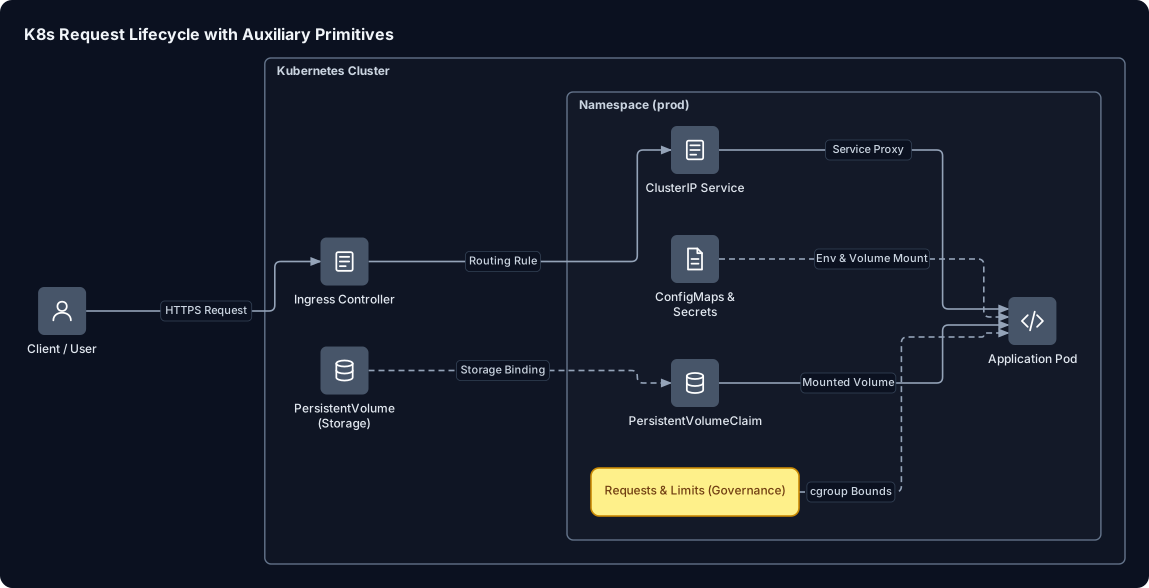
Beyond Pods, Deployments, and Services, a production-grade Kubernetes cluster relies on auxiliary primitives to manage security boundaries, runtime configuration, durable storage, and resource contention.
Supporting Primitives: Configuration, Isolation, and Quotas
Modern applications decouple immutable code from environment-specific configuration and storage. Kubernetes handles these concerns with specialized API resources:
- Namespaces: Provide virtual isolation within the same physical cluster, allowing multiple teams or deployment stages to coexist without naming collisions.
- ConfigMaps and Secrets: Inject plain-text configuration and sensitive credentials (such as tokens or API keys) into containers via environment variables or mounted volumes, decoupling runtime state from container images. According to the Google Cloud GKE architecture guide, Kubernetes persists the state of objects like ConfigMaps, Secrets, and Deployments in the
etcdkey-value store. - PersistentVolumes (PV) and PVCs: Abstract underlying cloud or physical block storage away from application Pods, ensuring data persists across container restarts and rescheduling.
- Resource Requests and Limits: Enforce compute governance. Requests specify the baseline CPU and memory guaranteed for scheduling onto a node, while Limits set strict ceilings preventing rogue workloads from exhausting node memory.
| Auxiliary Primitive | Primary Function | Failure / Misconfiguration Risk |
|---|---|---|
| Namespace | Multi-tenancy and resource boundary isolation | Unintended cross-team resource clashes or quota exhaustion |
| ConfigMap / Secret | Decoupling environmental configuration from container images | Application crashes if keys are missing; unencrypted secrets exposure |
| PV / PVC | Durable stateful storage decoupled from Pod lifecycles | Pod scheduling blocks (Pending) if physical storage cannot bind |
| Requests / Limits | Capacity allocation and runaway memory containment | Overcommitment causes node instability or OOM-killed containers |
Ingress and the End-to-End Request Path
While a ClusterIP Service provides an internal virtual IP and a NodePort exposes raw ports, managing hundreds of individual ports becomes unmaintainable. An Ingress acts as a centralized Layer 7 reverse proxy, consolidating HTTP and HTTPS routing, path-based dispatching, and TLS termination behind a single public entry point.
As detailed in DevopsCube's Kubernetes Architecture analysis, a Kubernetes cluster divides responsibilities: control plane nodes maintain the cluster state while worker nodes execute container workloads. The official Kubernetes architecture documentation explains that kube-proxy runs on nodes to maintain network rules and implement Service virtual routing, while the kube-apiserver acts as the control plane front end.
Here is how an incoming user request traverses the cluster from edge to execution:
- Edge Entry: An external client issues a request resolved by DNS to an external Load Balancer routing into the cluster's Ingress Controller.
- Path Matching: The Ingress Controller inspects the HTTP host header and URI path, mapping the request to the target cluster
Service. - Network Translation: The packet reaches a worker node where kube-proxy network rules translate the Service's virtual IP into a healthy, ready Pod IP.
- Execution: The target Pod receives the request, processes it inside the container runtime, and writes persistent updates to its mounted PVC.
7. Summary & What's Next
We have transitioned from viewing containers as standalone, isolated runtimes to understanding how Kubernetes coordinates them into a cohesive, self-healing system. At its foundation, a Kubernetes cluster divides responsibility between an administrative control plane and worker nodes that execute your workloads. Instead of managing container lifecycles manually, you declare your desired system state in manifests, and Kubernetes relies on continuous reconciliation loops to observe actual state and correct discrepancies automatically.
Core Primitives Summary
| Primitive | Role in Cluster | Operational Takeaway |
|---|---|---|
| Control Plane | Manages cluster state, scheduling, and API requests | Central authority running the API server, scheduler, and controller managers. |
| Worker Node | Runs containerized workloads | Hosts the kubelet, container runtime, and kube-proxy proxying traffic. |
| Pod | Smallest deployable compute unit | Colocates tightly coupled containers sharing network and storage namespaces; ephemeral by default. |
| Deployment | Manages ReplicaSets declaratively | Provides automated rollouts, rollbacks, and replica scaling without manual intervention. |
| Service | Stable network abstraction | Gives ephemeral Pods a persistent virtual IP and distributes traffic across healthy instances. |
| Health Probes | Startup, liveness, and readiness checks | Prevents traffic from reaching unready containers and restarts stalled processes. |
What's Next: Hands-On Practice
To move from architecture to implementation, test these primitives in a lightweight local cluster:
- Spin up a local cluster: Use local orchestrators like Minikube or Kind (
kind create cluster) to run a multi-node cluster environment directly on your workstation. - Deploy your first workload: Write a basic
DeploymentYAML exposing an NGINX container, apply it withkubectl apply -f deployment.yaml, and scale replicas usingkubectl scale. - Expose and test networking: Attach a
ClusterIPorNodePortService to verify internal DNS resolution and traffic distribution across Pod IPs. - Inspect and debug: Practice cluster troubleshooting using key diagnostic commands:
# Inspect workload health and scheduled events
kubectl get pods -o wide
kubectl describe pod <pod-name>

# Stream logs and open an interactive shell inside a running container
kubectl logs -f <pod-name>
kubectl exec -it <pod-name> -- /bin/sh
References
- Cluster Architecture — Kubernetes
- Architecture | The Kubernetes Visual Handbook — k8s.info
- GKE cluster architecture | Google Kubernetes Engine (GKE) | Google Cloud Documentation — Google Cloud Documentation
- Kubernetes Components — Kubernetes
- Kubernetes Architecture Explained (With Illustrated Diagrams) — DevOpsCube – Easy DevOps, SRE Guides & Reviews
- Liveness, Readiness, and Startup Probes — Kubernetes
- Configure Liveness, Readiness and Startup Probes — Kubernetes